
You can easily change the password if you have access to your WordPress account.
1. Log in to the WordPress dashboard.
2. From the Dashboard menu, go to Users and click on Profile.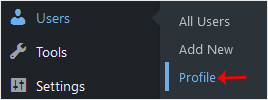
3. Scroll down to Account Management and click on Set New Password.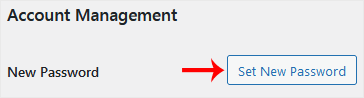
4. Copy the password to a safe place and click on Update Profile to change your password.
- Home
-
Store
- Browse All
- PROFESSIONAL HOSTING
- Linux VPS
- Windows VPS
- Cloud Storage
- S3 Object Storage
- Server Cloud Linux
- Server Cloud Windows
- Cloud Computer's
- GMail G Suite
- Office 365
- Skype
- Azure
- SharePoint
- OneDrive
- Visio Online
- Exchange Online
- Google ADS & Facebook ADS
- Rack System assistance
- Web System assistance
- SSL Certificates
- XOVI NOW
- VPN
- Register a New Domain
- Transfer Domains to Us
- Announcements
- Knowledgebase
- Network Status
- Contact Us
- Whois
-
More